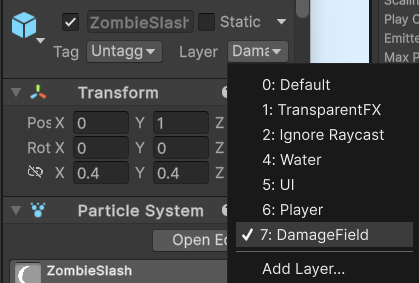
먼저 파티클 프리팹을 준비한다음 레이어를 데미지필드로 설정한다. (플레이어는 Player레이어로 설정해두어야함)
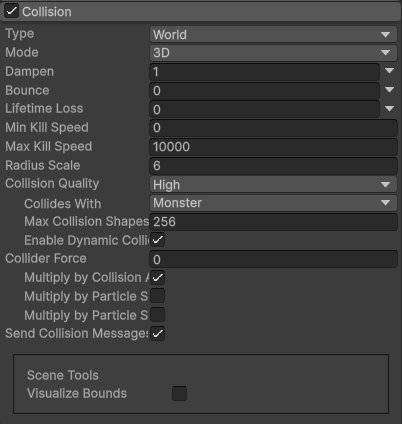
파티클시스템 컴포넌트에서 Type을 World로 지정하고 Collides With에서 파티클과 충돌할 레이어를 하나 지정한다.
Send Collision Messages를 체크하여 충돌여부를 전송한다.
using System;
using UnityEngine;

public class ParticleCollider : MonoBehaviour
{
    private ParticleSystem particleSystem;

    private void Start()
    {
        particleSystem = GetComponent<ParticleSystem>();
    }

    private void OnParticleCollision(GameObject other)
    {
        //Debug.Log($"OnParticleCollision ${other.name}");
        Monster1 monster = other.GetComponent<Monster1>();
        if (monster != null)
        {
            //float stunDuration = 1.0f;  // 스턴 지속 시간
            //monster.Stun(stunDuration);
            switch (gameObject.name)
            {
                case "Lightning":
                    monster.Stunned();
                    break;
                case "Laser":
                    monster.Attacked(34);
                    break;
                case "Meteors":
                    monster.Attacked(50);
                    break;
                case "Explosion":
                    monster.Attacked(100);
                    break;
            }
        }
    }
}'UNITY > PROJECT' 카테고리의 다른 글
| 포물선 그리기 +Vector3.Dot에 대한 이해 (0) | 2024.11.22 |
|---|---|
| Invoke() :: UnityEvent 또는 델리게이트에 등록된 메서드 실행하기. (0) | 2024.11.11 |
| 프로퍼티와 public 필드의 차이점 (0) | 2024.10.29 |
| NavMeshAgent의 isPathStale, remainingDistance (0) | 2024.10.29 |
| magnitude와 sqrMagnitude (0) | 2024.10.29 |
