https://post.naver.com/viewer/postView.naver?volumeNo=33471967&memberNo=25379965&vType=VERTICAL
클래스다이어그램 UML 참고
UML 그리기 링크
https://gitmind.com/app/recents?lang=kr
// 추상 팩토리 패턴

using UnityEngine;

public interface Shape
{
    void Draw();
}

public class Rectangle : Shape
{
    public void Draw()
    {
        Debug.Log("Rectangle");
    }
}

public class Sphere : Shape
{
    public void Draw()
    {
        Debug.Log("Sphere");
    }
}

public class Triangle : Shape
{
    public void Draw()
    {
        Debug.Log("Triangle");
    }
}


public class SuperRectangle : Shape
{
    public void Draw()
    {
        Debug.Log("SuperRectangle");
    }
}

public class SuperSphere : Shape
{
    public void Draw()
    {
        Debug.Log("SuperSphere");
    }
}

public class SuperTriangle : Shape
{
    public void Draw()
    {
        Debug.Log("SuperTriangle");
    }
}

public interface ShapeFactory
{
    Shape getShape(string typeString);
}

public class SimpleShapeFactory : ShapeFactory
{
    public Shape getShape(string typeString)
    {
        switch (typeString)
        {
            case "Rectangle":
                return new Rectangle();
            case "Sphere":
                return new Sphere();
            case "Triangle":
                return new Triangle();
        }

        return null;
    }
}

public class SuperShapeFactory : ShapeFactory
{
    public Shape getShape(string typeString)
    {
        switch (typeString)
        {
            case "Rectangle":
                return new SuperRectangle();
            case "Sphere":
                return new SuperSphere();
            case "Triangle":
                return new SuperTriangle();
        }

        return null;
    }
}

public class FactoryProvider
{
    public static ShapeFactory GetFactory(string factoryType)
    {
        switch (factoryType)
        {
            case "Simple":
                return new SimpleShapeFactory();
            case "Super":
                return new SuperShapeFactory();
        }

        return null;
    }
}

public class AbstractFactoryExample : MonoBehaviour
{
    void Awake()
    {
        {
            ShapeFactory shapeFactory = FactoryProvider.GetFactory("Simple");

            Shape shape = shapeFactory.getShape("Sphere");
            shape.Draw();
        }
        {
            ShapeFactory superShapeFactory = FactoryProvider.GetFactory("Super");

            Shape shape = superShapeFactory.getShape("Sphere");
            shape.Draw();
        }
    }
}
유니티에서 스퀘어, 스피어 프리팹으로 만들어서 Resources폴더에 넣어줌
using System.Collections;
using System.Collections.Generic;
using UnityEngine;


public interface UnityShapeFactory
{
    static GameObject  getShapeInstance(string typeString)
    {
        throw new System.NotImplementedException();
    }
}


public class UnitySimpleShapeFactory : UnityShapeFactory
{
    public static GameObject getShapeInstance(string typeString)
    {
        switch (typeString)
        {
            case "Rectangle":
            {
                GameObject prefab = Resources.Load("Cube") as GameObject;
                return GameObject.Instantiate(prefab);
            }
            case "Sphere":
            {
                GameObject prefab = Resources.Load("Cube") as GameObject;
                return GameObject.Instantiate(prefab);
            }
        }

        return null;
    }
}

public class AbstractFactoryExample_Unity : MonoBehaviour
{
    // Start is called before the first frame update
    void Start()
    {
        UnitySimpleShapeFactory.getShapeInstance("Rectangle");
    }

    // Update is called once per frame
    void Update()
    {

    }
}
위 코드를 조금 더 줄인 방식
using System.Collections;
using System.Collections.Generic;
using UnityEngine;

public class UnitySimpleShapeFactory
{
    public static GameObject getShapeInstance(string typeString)
    {
        GameObject prefab = Resources.Load(typeString) as GameObject;
        return GameObject.Instantiate(prefab);
    }
}

public class AbstractFactoryExample_Unity : MonoBehaviour
{
    public string CreateShapeName;

    // Start is called before the first frame update
    void Start()
    {
        UnitySimpleShapeFactory.getShapeInstance(CreateShapeName);
    }

    // Update is called once per frame
    void Update()
    {

    }
}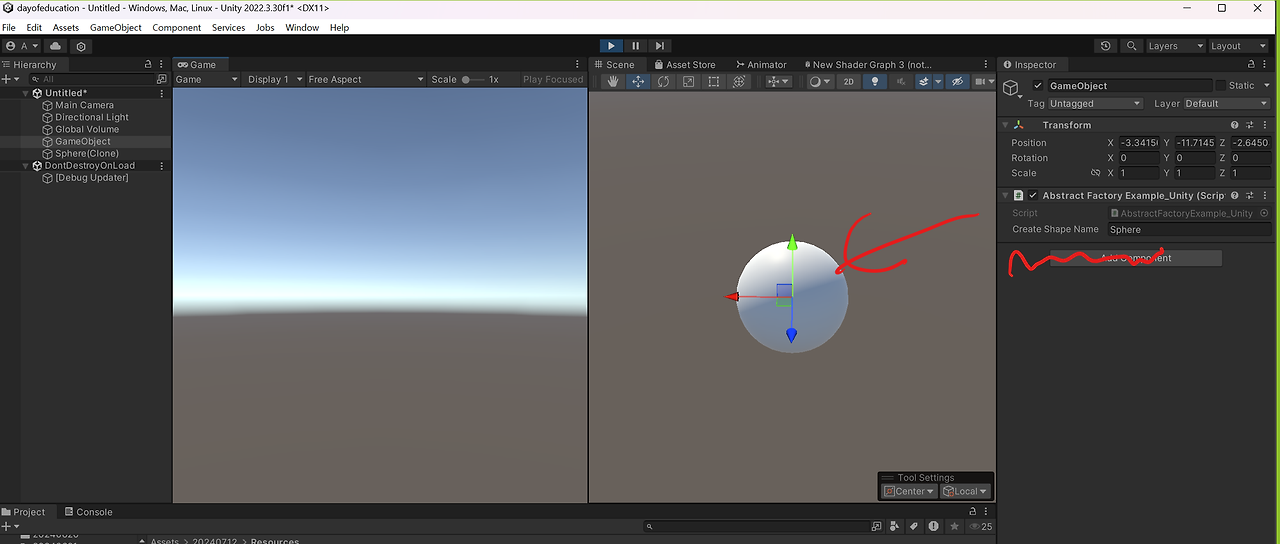
CreateShapeName 에 리소스 넣는 방식으로 손쉽게 구현 가능
'STUDY > 디자인패턴' 카테고리의 다른 글
| Command 커맨드 패턴 ★★★ (0) | 2024.07.16 |
|---|---|
| chain of responsibility 책임연쇄 패턴 (0) | 2024.07.16 |
| Proxy 프록시 패턴 (0) | 2024.07.15 |
| Flyweight 플라이웨이트 패턴 (0) | 2024.07.15 |
| Singletone 싱글톤 패턴 ★★★ (0) | 2024.07.12 |